Education Portal 3.0 | एजुकेशन पोर्टल 3.0 | MP Shiksha Portal Complete Guide
Madhya Pradesh runs one of India’s largest school education networks. It covers over 45,000 government schools, millions of students, and thousands of teachers spread across 52 districts and 313 development blocks. Managing such a large education system manually was inefficient. That’s why the School Education Department of Madhya Pradesh (DSE MP) introduced Education Portal 3.0. It was developed in partnership with NICSI (National Informatics Centre Services Incorporated) under the Ministry of Electronics and Information Technology, Government of India.
It is a single, Aadhaar-verified, Samagra ID-linked digital platform. Where students are admitted, teachers get registered, Transfer Certificates are generated, and guest faculty scorecards are updated. District officers, from Block Education Officers (BEOs) to District Education Officers (DEOs), monitor everything in real time from one unified dashboard. This portal will tell you everything about Education Portal 3.0, from first-time login and student registration to TC generation, GFMS guest teacher enrollment, and school administration.
What Is Education Portal 3.0?
Education Portal 3.0 is the official digital platform of the School Education Department, Madhya Pradesh. Launched on 1 April for the 2025–26 academic session, Ver Education Portal 3.0 is a centralized platform for school education services. The system is currently being used for the 2026–27 session. This portal serves as the upgraded and unified version of the older Education Portal 2.0 and Shiksha Portal.
The platform ensures transparency, efficiency, and accessibility for every stakeholder in the MP school education system. The School Education Department of Madhya Pradesh regularly publishes updated schemes, circulars, and notifications directly through Education Portal 3.0. These updates cover new appointments for guest teachers, student registration deadlines, school data submission schedules, and administrative policy changes across all 52 districts. According to official sources, the portal at sederp.educationportal3.in has already completed initial verification for more than 3,200 schools in Indore district.
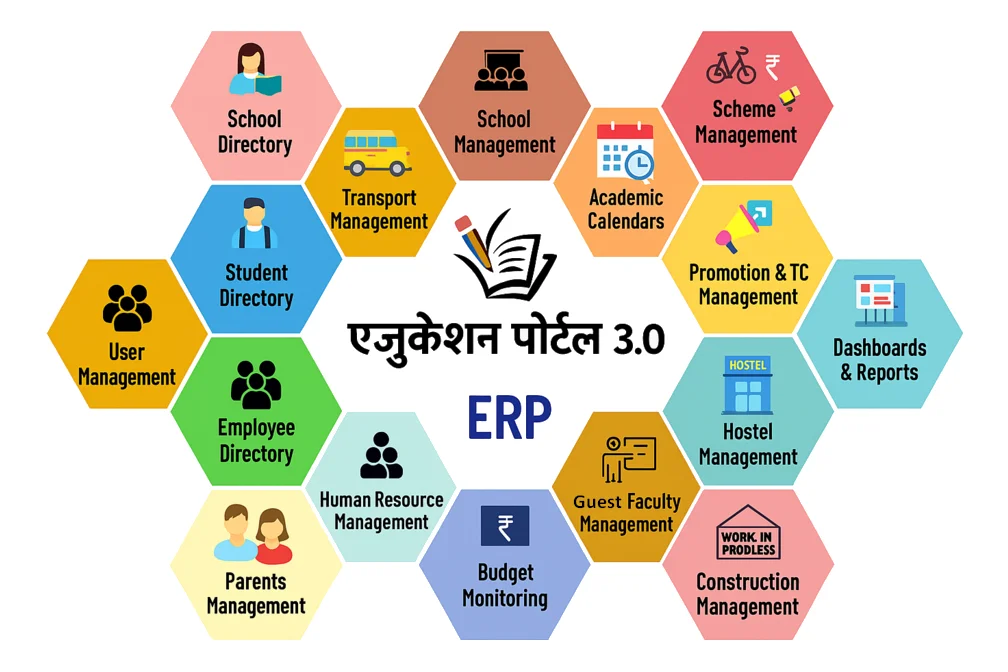
Key Components of Education Portal 3.0
- Unified Database: Every student, teacher, and school in Madhya Pradesh shares one centralized data repository. Over 1.2 crore student profiles and 3 lakh+ teacher records are maintained here in real time.
- Student Management: When a student joins a school, their profile is created on the portal. From that day, attendance, results, class promotions, and Transfer Certificates are all managed digitally.
- Teacher Administration: Both permanent teachers and guest teachers are managed in one place. Posting orders, subject assignments, and document verification all happen online.
- Real-Time Monitoring: District and block officers can see live data every day, such as Attendance rates, enrollment numbers, and school compliance, which are all visible on one dashboard.
- Guest Faculty Management System (GFMS): Temporary teachers register at gfms.educationportal3.in. Where they can upload documents, verify identity with Aadhaar, and get a scorecard automatically.
- Data Verification: Every school, whether government, private, or aided, goes through the same verification process. All data are cross-checked with UDISE+ and Samagra Portal to make sure everything is accurate.
- Mobile Integration: Two apps make the portal mobile-friendly. Hamare Shikshak tracks teacher attendance, and the Child Tracking App monitors student enrollment and dropouts.
Key Benefits of Education Portal 3.0
Before 2023, managing school education in Madhya Pradesh involved paper registers, manual reports, and weeks of waiting. But now the same work is done in minutes, which gives a lot of advantage to teachers, students, administrators, and government officials.
For Schools and Administrators
- Paper-based registers and manual records have been replaced with centralized digital workflows.
- Student, teacher, and administrative records stored securely in one verified online system
- School reports and compliance data are submitted directly to district offices through the portal
- Enrollment numbers are real, so resource requests are finally accurate
- New admissions, exits, and transfers are updated the same day they happen
For Teachers
- Attendance takes two minutes on a screen instead of twenty minutes in a register
- Posting orders, transfers, and official updates appears instantly on the personal dashboard
- Student grades and progress reports are entered once, saved permanently, and accessible anytime
- Important documents can be submitted online without photocopies or repeated office visits
- Faster communication with principals, BEOs, and school administration through direct digital access
For Guest Faculty
- Guest faculty selection is based on verified marks, qualifications, and teaching experience through a transparent scorecard system
- Aadhaar eKYC verification helps prevent fake registrations and confirms candidate identity securely
- Experience certificates and required documents can be uploaded online through the GFMS portal
- Cluster Coordinators usually review submitted applications and documents within a few working days
- Applicants can track registration, verification, and appointment status live on the portal remotely
- GFMS registration is accessible online through mobile phones, tablets, and laptops from anywhere in Madhya Pradesh
For Students and Parents
- Online enrollment allows parents to complete admission-related tasks without repeated school visits
- Parents can quickly check student attendance and school updates through mobile access, even in remote areas
- Report cards, certificates, and academic records are stored digitally for safe and long-term access
- Transfer Certificates (TC) is generated online as verified PDF documents within minutes
- The Child Tracking System helps schools identify frequent absences early and reduce student dropout risks
For District and Block Officers
- Real-time dashboards simplify the monitoring of schools, attendance, and enrollment data
- Early identification of low-performing or high-risk schools through live analytics
- Unified visibility of guest teacher appointments and staffing updates across districts
- Automated alerts for missed attendance submissions and reporting delays
- Faster and more accurate administrative decisions based on verified digital records
- Reduced dependency on manual reports, phone calls, and physical field verification
- Improved coordination between schools, block offices, and district education authorities
For the State Government
- Real-time reporting from all 52 districts supports faster and more accurate education policy decisions
- Aadhaar-linked verification helps reduce fake enrollments and duplicate teacher records
- School funding and resource allocation are based on verified student and school data
- Digital workflows speed up administrative approvals and reduce delays caused by manual paperwork
- Guest teacher recruitment and education spending remain transparent through complete digital audit trails
- Centralized education data improves planning, monitoring, and accountability across the state school system
Core Objectives of Education Portal 3.0
The School Education Department introduced the MP Education Portal 3.0 to build a faster, transparent, and fully digital education system across the state. Its main goal is to simplify school administration, improve data accuracy, and connect students, teachers, schools, and district authorities. The new portal, Education 3.0, brings all services and management tools together on one integrated portal.
Below are the major objectives behind the launch of Portal 3.0.
Digital Transformation of School Education
- Education Portal 2.0 and Shiksha Portal replaced with one unified platform at sederp.educationportal3.in
- Paper registers and manual files have been eliminated from 45,000+ government schools across MP
- Teachers, principals, and DEOs access live school data from any device, any time
- System designed to grow, ready to connect with APAAR ID and future national education frameworks
Improving Operational Efficiency
- Daily attendance, result compilation, and compliance reports are automated across all schools
- Transfer Certificate processing has been reduced from two weeks to under ten minutes
- Auto-validation catches wrong data at the entry point before it enters the system
- Education portal login gives every user instant access to their own dashboard and tasks
Enhancing Transparency and Accountability
- Every login and every change on the mpeducationportal are saved automatically with date, time, and user details.
- Guest faculty scorecard rules on the GFMS portal are open for everyone to read, with no hidden criteria.
- DEOs and BEOs see every day which schools submitted data and which ones did not live on their dashboard.
- School budgets in MP are now based on real student numbers from Education Portal.
- संकुल के अंतर्गत अतिथि शिक्षकों की सूची published online, anyone can check guest teacher appointments in their area.
Building Accurate and Verified Education Data
- Students and teachers are verified through Aadhaar eKYC and Samagra ID before records are approved.
- School data connects directly with UDISE+ and Samagra systems, reducing manual updates and syncing errors.
- Duplicate student profiles are automatically detected and flagged by the portal.
- Schools across all 313 development blocks are being verified with official UDISE codes.
Empowering Students, Parents, and Teachers
- Students can complete registration online using their Samagra ID, reducing the need for repeated school visits.
- Parents, even in remote villages, can check attendance and academic results easily from a mobile phone.
- Teachers manage postings, subject details, and salary-related information through one centralized login system.
- Guest faculty applicants can register from home, upload documents, complete Aadhaar eKYC, and receive scorecards online.
- School principals can generate verified Transfer Certificate (TC) PDFs digitally within minutes without lengthy approval procedures.
Better Resource Planning and Management
- The system automatically identifies potential dropouts within the first two months of the session if promotion or enrollment data is missing.
- Principals of senior schools can view lists of students finishing Class 5 or 8 in nearby primary schools and proactively enroll them.
- Using real-time enrollment data helps education departments allocate budget and teaching staff more effectively across districts.
Standardizing Guest Teacher Recruitment Across MP
- The GFMS portal generates merit lists automatically using verified academic scores and experience records.
- Subject-wise guest teacher vacancies are displayed publicly to improve transparency and equal access for applicants.
- Guest faculty can complete registration, document uploads, verification, and joining processes fully online without paperwork or repeated office visits.
Top Services Available on Education Portal 3.0
Education Portal mp 3.0 is not just a login page. It is a complete digital system where every service related to school education in Madhya Pradesh is handled in one place. Here is what the platform offers.
Student Registration and Enrollment
Portal 3.0 makes student enrollment in Madhya Pradesh government schools much simpler than before. Now, parents can complete most of the admission process online using the student’s Samagra ID and Aadhaar details. After registration, the system creates a unique Student Tracking ID that keeps the student’s academic records connected across schools in Madhya Pradesh. An APAAR ID is also generated during enrollment, helping maintain academic records even if the student later moves to another state or education board.
Attendance Management
Teachers record daily attendance online with real-time updates. If a student starts missing classes regularly, the Child Tracking System automatically flags the issue and alerts Block Education Officers. This allows schools and education officials to take early action before temporary absences turn into permanent dropouts.
Transfer Certificate (TC) Generation
School administrators can generate a Transfer Certificate directly through the sederp.educationportal3.in dashboard. Student details are fetched automatically using the Samagra ID, reducing manual errors. The Transfer Certificate (TC) is generated as a verified PDF within minutes. Earlier, the process often required multiple school visits and lengthy follow-ups, but it can now be completed much faster through the online system.
Guest Faculty Management Through GFMS
If you want to apply as a guest teacher in an MP government school, the entire process can be completed online through the GFMS portal. Applicants can register at gfms.educationportal3.in, upload qualification and experience documents, and complete Aadhaar eKYC for identity verification.After document verification, the system automatically generates a scorecard based on the applicant’s qualifications and teaching experience. Applicants can track verification and appointment status directly on the GFMS dashboard.
Teacher Profile and Payroll Services
Every permanent teacher in Madhya Pradesh receives a unique Teacher ID through the education portal system. Using a single login, teachers can view posting orders, subject assignments, and salary slip records online. Profile updates and document submissions are also handled digitally, reducing paperwork and unnecessary office visits.
School Registration and Directory Services
District Education Officers register new schools through the OIS Registration module on the portal. Each government, private, or aided school is assigned a verified UDISE code for proper identification. School infrastructure, staff strength, and facility details are regularly updated in the system. A complete, searchable school directory is available across all 52 districts of Madhya Pradesh.
Student Academic Records
Student marks, grades, and promotion history are stored digitally and accessible anytime through the portal login. All certificates are saved digitally, eliminating the risk of loss due to damage, accidents, or time. These records remain linked to the Samagra ID, allowing them to follow the student across different schools without interruption.
Data Verification and Compliance Monitoring
Every record on the Shiksha Portal 3.0 is verified by cross-checking it with Aadhaar, Samagra Portal, and UDISE+ databases. The system automatically detects duplicate student or teacher entries and flags them before they can create issues in records or reporting. District Education Officers (DEOs) and Block Education Officers (BEOs) can view live compliance status for all schools in their area, including which schools have submitted data on time and which are still pending.
Helpdesk and Technical Support
Users can access multiple support options on Education 3.0 to resolve issues quickly. The portal provides online help documentation and user manuals, along with video tutorials for common tasks.
For direct support, users can contact the official helpdesk at [email protected] or call the helpline number 0755-2600124 (10:30 AM to 5:30 PM). Guest teachers can also reach dedicated support at [email protected].
Education Portal 3.0 Login Process (Step-by-Step Guide)
The login process Education Portal 3.0 MP is simple, but users must enter the correct credentials and select the appropriate portal section to access their dashboard successfully.
Follow the step-by-step guide below to log in to Education Portal 3.0 quickly and securely.
School Login Process (Principals & Teachers)
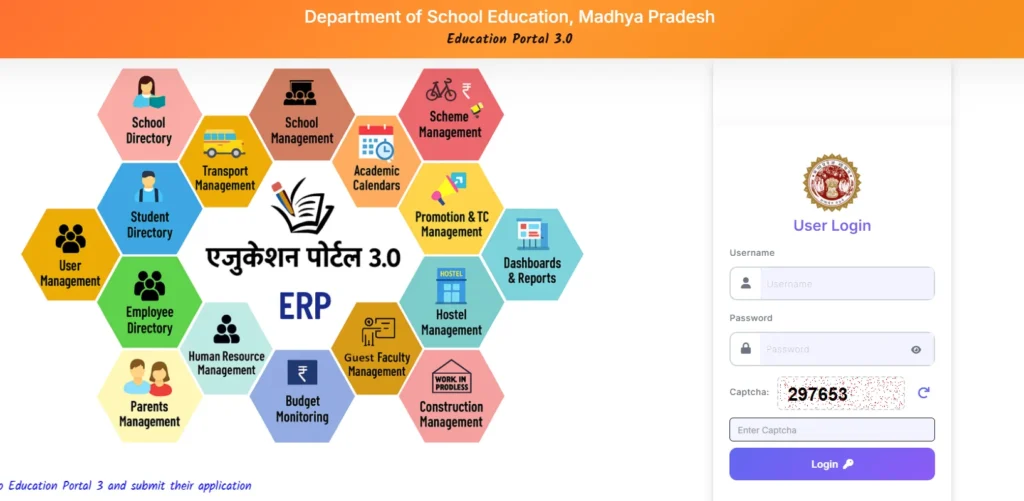
Step 1: Open sederp.educationportal3.in in Google Chrome
Step 2: Enter your username and password
Step 3: Fill in the captcha code shown on the screen
Step 4: Click on Login
Step 5: Your school dashboard will open, where you can manage students, attendance, Transfer Certificates, and staff records
DEO / BEO (District & Block Officers) Login Process
Step 1: Go to sederp.educationportal3.in
Step 2: Enter your DEO/BEO username and password
Step 3: Fill in the captcha and click on Login
Step 4: The district or block dashboard will open, where you can monitor schools, compliance, and guest faculty data
First-Time Login Setup
Step 1: Use the default credentials provided by your school admin or district office
Step 2: The portal will ask you to change your password immediately
Step 3: Set a strong new password using letters, numbers, and symbols
Step 4: Log in again with your new password
Note: Never skip this step. Default passwords are not secure.
Forgot Password / Reset Process
Step 1: Go to sederp.educationportal3.in and click on “Forgot Password”
Step 2: Enter your username
Step 3: Enter your registered email address
Step 4: Check your email for password reset instructions
Step 5: Open the link and set a new password
Step 6: Log in again with the new password
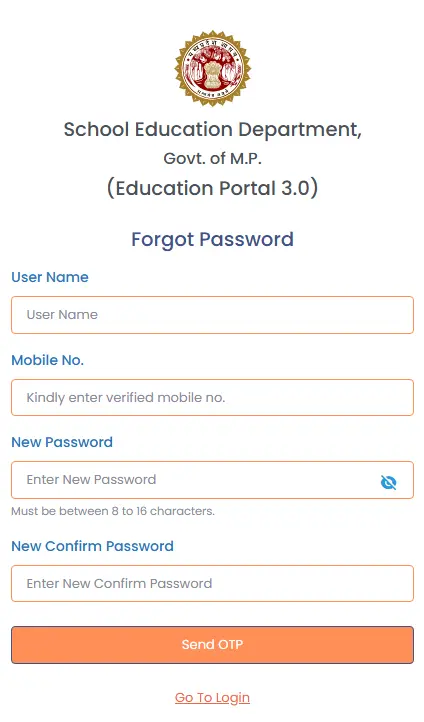
Note: Forgot password on Education Portal 3.0 uses email verification, not OTP. Make sure your email is registered and active.
Security Tips for Login
- Never share your password with anyone
- Always log out after finishing, especially on shared or public computers
- Change your password every 3 months
- Use only the official URL: sederp.educationportal3.in
- Report any unusual activity to [email protected]
Common Login Problems & Solutions
While using एजुकेशन पोर्टल 3.0, some users may face login-related issues. Most of these problems can be resolved quickly by following the correct troubleshooting steps. Below are some of the most common login problems faced by school users, DEOs, and GFMS users, along with their solutions:
Wrong Username or Password
- Check whether Caps Lock is turned on, because passwords are case sensitive
- Make sure there are no extra spaces in your username or password
- If you forgot your password, use the “Forgot Password” option on sederp.educationportal3.in to reset it
Captcha Not Loading
- Refresh the CAPTCHA and enter it again carefully
- Clear your browser cache by pressing Ctrl + Shift + Delete
- Try using Google Chrome, as it works best with 3.0 Portal
Password Reset Email Not Received
- Check your spam or junk folder if the reset email is not visible
- Make sure your registered email address is entered correctly
- If your email address has changed, contact [email protected] with your username and school details
Portal Not Loading
- Check your internet connection before trying to log in again
- Clear browser cache and cookies to remove old session data
- Use Google Chrome or Mozilla Firefox for better compatibility
- Internet Explorer is not supported and may cause login problems
Account Locked
- If your account is locked, wait around 30 minutes before trying again
- You can also reset your password using the “Forgot Password” option
- If the account is still locked, contact [email protected] with your username and school UDISE code for support
Dashboard Blank After Login
- If the dashboard appears blank after login, try opening the portal in Google Chrome
- Clear your browser cache and reload the page
- If the issue continues, contact your school admin or DEO to check account permissions
GFMS Login Not Working
- Use gfms.educationportal3.in instead of the main Education Portal website
- Enter your Registration Number as the username during login
- Make sure Aadhaar eKYC was completed successfully during registration
- If the problem continues, contact [email protected] for support
OTP Not Received
- Check your mobile network signal before requesting the OTP again
- Wait for 1–2 minutes and then request a new OTP
- If your mobile number has changed, contact [email protected] for account update support
Guest Faculty Management System (GFMS) on Education Portal 3.0
Guest Faculty Management System (GFMS) is a simple online system on Education Portal 3.0 by the School Education Department of Madhya Pradesh. It is used for atithi shikshak work like registration, document checking, scorecard, and school allotment, all in one place at gfms.educationportal3.in.
Before GFMS, guest teacher recruitment in Madhya Pradesh government schools was paper-based and often inconsistent. GFMS replaced that system with a merit-based digital process where qualifications and verified teaching experience determine selection in a transparent way.
Today, GFMS supports thousands of atithi shikshak candidates across all 52 districts of Madhya Pradesh. Every candidate follows the same process, receives the same scorecard system, and gets an equal opportunity regardless of district or block. For complete details, visit our dedicated GFMS Portal Guide.
How to Register a New School on Education Portal 3.0 (Full Process)
School registration on mp education portal 3.0 is a controlled process handled at the district level to ensure accurate data entry and proper verification. Only authorized District Education Officers (DEOs) are allowed to register new schools in the system. This process helps maintain official records, standardization, and validation of all school information before it becomes active on the portal.
Below is the complete step-by-step process for registering a new school on Portal 3.0:
Step 1: Open https://sederp.educationportal3.in and log in using DEO credentials
Step 2: From the main dashboard, open the “School Directory” section
Step 3: Select the “OIS Registration” option
Step 4: Click on “School Registration”
Step 5: Enter all required details like school name, address, block, UDISE code, and school type
Step 6: Review the information and click “Save” to complete the process
Quick Path
DEO Login → School Directory → OIS Registration → School Registration → Fill Details → Save
How to Close a School on Education Portal 3.0
Closing a school on the education 3.0 portal requires approval from the education department. District Education Officers (DEOs) can submit the request, but the final closure is approved at the departmental level.
Step 1: Log in with DEO credentials and open School Directory, select the OIS Verification submenu, and click on Close School option
Step 2: Select the Block and enter the School UDISE Code to search the school record
Step 3: Click on “Request for Close School” and submit the request
Step 4: The department reviews the request and verifies the submitted details
Step 5: Once approved, the school status is updated as “Closed” on the portal
Quick Path
DEO Login → School Directory → OIS Verification → Close School → Search School → Submit Request
How to Reopen a Closed School on Education Portal 3.0
A closed school cannot be reopened directly through the portal. The process requires approval from the School Education Department of Madhya Pradesh.
Step 1: The DEO must send an official request email to the School Education Department for school reopening
Step 2: The request should include:
- School name
- School UDISE code
- Block and district name
- Reason for reopening
- Supporting documents, if required
Step 3: The department reviews the request and verifies the submitted details
Step 4: After approval, the school status is changed back to “Active” on Education 3.0 Portal Step 5: Once activated, the DEO can again manage the school through the School Directory on sederp.educationportal3.in
How to Update Student Profile on Education Portal 3.0
Student profiles on ejukeshan portal 3.0 are managed through the school login dashboard. Schools can update most student details directly, while major changes, such as identity or verification-related updates, may require DEO or DPI approval.
Steps to Update Student Profile
Step 1: Open sederp.educationportal3.in and log in using your school credentials
Step 2: Go to the Student Directory from the main dashboard
Step 3: Select Profile Updation and choose the student’s class
Step 4: Search the student using Samagra ID or name
Step 5: Edit required details like class, section, contact, or enrollment status
Step 6: Update academic records such as attendance, marks, or promotion status if needed
Step 7: Review all changes carefully and click Save
Step 8: System confirms the update once changes are successfully saved
How to Generate Transfer Certificate (TC) on Education Portal 3.0
A Transfer Certificate (TC) is an official academic document issued by a school when a student leaves or is transferred to another institution. On education portal mp 3.0, the entire TC process has been digitized to make it faster, more transparent, and fully system-based. Schools can generate and manage TCs directly on the dashboard without manual paperwork or lengthy offline procedures
Step-by-Step TC Generation Process
Step 1: Open sederp.educationportal3.in and log in using school credentials
Step 2: Go to the “Student Directory” section from the dashboard
Step 3: Select the “Generate Transfer Certificate” option
Step 4: Enter the student’s Samagra ID to fetch profile details automatically
Step 5: Verify student information like name, class, admission date, and school details
Step 6: Fill in the required TC information, such as reason for leaving and last attendance date
Step 7: Click on “Generate TC” to create the certificate
Step 8: Save and download the Transfer Certificate PDF
Step 9: Print the TC on school letterhead and get it signed by the Principal
How to Generate TC for Students of Closed or Merged Schools
If a school has been closed or merged, the Transfer Certificate (TC) can be generated through the Education Portal 3.0 login of the student’s previous school. Schools simply need to enter the student’s Samagra ID and follow the normal TC generation process. If the original school login is inactive or records are not available, the DEO can generate the TC through backend access.
Step 1: Visit the District Education Office with student’s Samagra ID and the old school UDISE code
Step 2: DEO uses backend access to locate archived student records
Step 3: DEO resolves mapping issues through OIS Verification
Step 4: TC generated through DEO login and issued to the student or parent
Eligibility Criteria for Education Portal 3.0 Users
Education Portal 3.0 gives different login access to different users. Before logging in, check which category you fall under. Below are the basic eligibility requirements to use shiksha portal 3.0:
Eligibility for Teachers and Principals
- Must be a permanent or contractual employee of an MP government school
- Registered in Employee Directory on sederp.educationportal3.in
- Assigned a unique Teacher ID through the MP education portal
- Aadhaar and Samagra ID are linked to the employee profile
- Login credentials issued by DEO after registration
Eligibility for DEO and BEO
- Must be an appointed government officer under the School Education Department, MP
- DEOs receive district-wide access, while BEOs receive block-level access only
- Login credentials are assigned directly by the department after appointment
Eligibility for Guest Teachers (Atithi Shikshak)
- Must be a resident of Madhya Pradesh
- Minimum graduation from a recognized university
- B.Ed or D.El.Ed qualification required
- Aadhaar card linked with an active mobile number for eKYC on gfms.educationportal3.in
- Samagra ID registered on samagra.gov.in
Eligibility for Students and Parents
- Must be enrolled in an MP government school
- Must have a valid Samagra ID linked to the student profile
- Aadhaar card required for identity verification at the time of enrollment
- Parents can use the student login to view attendance and academic results
Documents Required for Education Portal 3.0 Registration
The required documents depend on the type of user registering on Education Portal 3.0. Each category has its own set of verification details to ensure accuracy and authenticity. Below is a clear list based on user type.
Documents Required for Student Registration
- Samagra ID
- Aadhaar Card
- Birth Certificate
- Previous School Marksheet
- Transfer Certificate from Previous School
- Passport Size Photograph
- Caste Certificate (for SC/ST/OBC category students)
- Income Certificate (for BPL or scholarship schemes)
Documents Required for Teacher Registration
- Aadhaar Card
- Samagra ID
- Graduation Certificate
- B.Ed or D.El.Ed Certificate
- Appointment Letter
- Service Book
- Passport Size Photograph
- Bank Account Details
Documents Required for Guest Teacher Registration on GFMS Portal
- Aadhaar Card (mandatory for eKYC on gfms.educationportal3.in)
- Samagra ID
- Graduation Certificate
- Post Graduation Certificate (if applicable)
- B.Ed or D.El.Ed Certificate
- Experience Certificates
- Caste Certificate (for SC/ST/OBC category)
- Disability Certificate (if applicable)
- Passport Size Photograph
- Active Mobile Number linked to Aadhaar
All documents must be clearly scanned before uploading. Blurry or incomplete documents will be rejected during Cluster Coordinator verification.
Documents Required for School Registration (DEO)
- School Recognition Certificate
- UDISE Code
- DEO (District Education Officer) Login Credentials
- School Infrastructure Details
- Principal Appointment Letter
- Land and Building Documents
Documents Required for Samagra ID and Aadhaar Linking
- Samagra ID
- Aadhaar Card
- Registered Mobile Number linked to Aadhaar
Samagra ID must be linked to Aadhaar before any registration on Education Portal 3.0. Link at samagra.gov.in before starting registration.
Education Portal 2.0 vs Education Portal 3.0
| Feature | Education Portal 2.0 | Education Portal 3.0 |
| System Type | Multiple separate portals | Single unified digital platform |
| Student Verification | Manual process | Aadhaar + Samagra eKYC |
| Data Accuracy | Errors and duplicates are common | Auto-validation + duplicate detection |
| Guest Teacher System | Paper-based process | Fully digital GFMS portal |
| Attendance System | Paper registers | Digital attendance system |
| Transfer Certificate | Slow manual process | Digital PDF in minutes |
| Student Tracking | Not available | Student Tracking ID system |
| Parent Access | Not available | Mobile access to records |
| Dropout Monitoring | Reactive reporting | Early alert system |
| Reporting System | Manual reports | Live dashboards |
Official Links & Important Resources for Education Portal 3.0
All official portals, apps, and contact details related to Education Portal 3.0 are listed below. Always use these verified government links for any school education task in Madhya Pradesh.
Official Government Websites
| Portal | Link |
| Education Portal 3.0 Main Portal | https://sederp.educationportal3.in |
| GFMS Portal (Guest Faculty Management) | https://gfms.educationportal3.in |
| MP School Education Department | https://educationportal.mp.gov.in |
| Samagra Portal (MP Family ID) | https://samagra.gov.in |
| MP Government Official Website | https://mp.gov.in |
Registration and Application Links
| Service | Link |
| Student Registration | https://sederp.educationportal3.in |
| Guest Teacher (Atithi Shikshak Registration) | https://gfms.educationportal3.in |
| GFMS Login (Guest Faculty Login) | https://gfms.educationportal3.in/GuestFacultyUserLogin |
| Samagra ID Registration and Linking | https://samagra.gov.in |
| UDISE+ School Data Submission | https://udiseplus.gov.in |
| School OIS Registration (DEO Login) | https://sederp.educationportal3.in |
Mobile Apps (Official Government Apps)
| App | Purpose | Download |
| Hamare Shikshak | Teacher attendance with GPS tracking | Google Play Store |
| Child Tracking App | Student enrollment and dropout monitoring | Google Play Store |
Download only from the Google Play Store. Search the exact app name to avoid fake versions.
Contact and Support (Official Government)
| Support | Details |
| Education Portal 3.0 Helpdesk | [email protected] |
| GFMS Helpdesk (Atithi Shikshak Support) | [email protected] |
| GFMS Helpline Phone | 0755-2600124 (10:30 AM to 5:30 PM) |
| SED Staff Login Support | sederp.educationportal3.in |
When emailing helpdesk, always include your name, school name, school code, Samagra ID or registration number, and a clear description of your issue.
Related Government Websites
| Website | Link |
| UDISE+ National Education Database | https://udiseplus.gov.in |
| NICSI (National Informatics Centre Services) | https://nicsi.com |
| Ministry of Education (Government of India) | https://education.gov.in |
| Samagra Shiksha Abhiyan MP | https://samagrashiksha.mp.gov.in |
| NIC (National Informatics Centre) | https://nic.in |
| NCERT | https://ncert.nic.in |
| MP Online | https://mponline.gov.in |
⚠️ Disclaimer: Every link on this page leads to an official government website on .gov.in or .nic.in domain. This website is privately operated and has no connection with the School Education Department of Madhya Pradesh or any government authority. We share information to help users understand the portal. Nothing here replaces official government sources. Always visit the official portals directly and confirm details before submitting any application or form.
Frequently Asked Questions (FAQs)
Conclusion
In conclusion, Education Portal 3.0 has made school education services in Madhya Pradesh faster, more transparent, and fully digital. From student registration and teacher management to GFMS guest faculty services and online TC generation, the portal connects every important education process on one platform. This guide explained the complete login process, registration steps, services, eligibility, documents, and official resources to help users easily understand and use the portal. Always use the official Education Portal 3.0 website for the latest updates and verified information.